|
SparkFun INA2XX Arduino Library
v1.0.0-3-gc9007d6
Arduino Library for the SparkFun Qwiic Power Monitor (INA228 / INA237)
|
|
SparkFun INA2XX Arduino Library
v1.0.0-3-gc9007d6
Arduino Library for the SparkFun Qwiic Power Monitor (INA228 / INA237)
|
Arduino Library for the SparkFun Qwiic Power Monitor (INA228 / INA237)





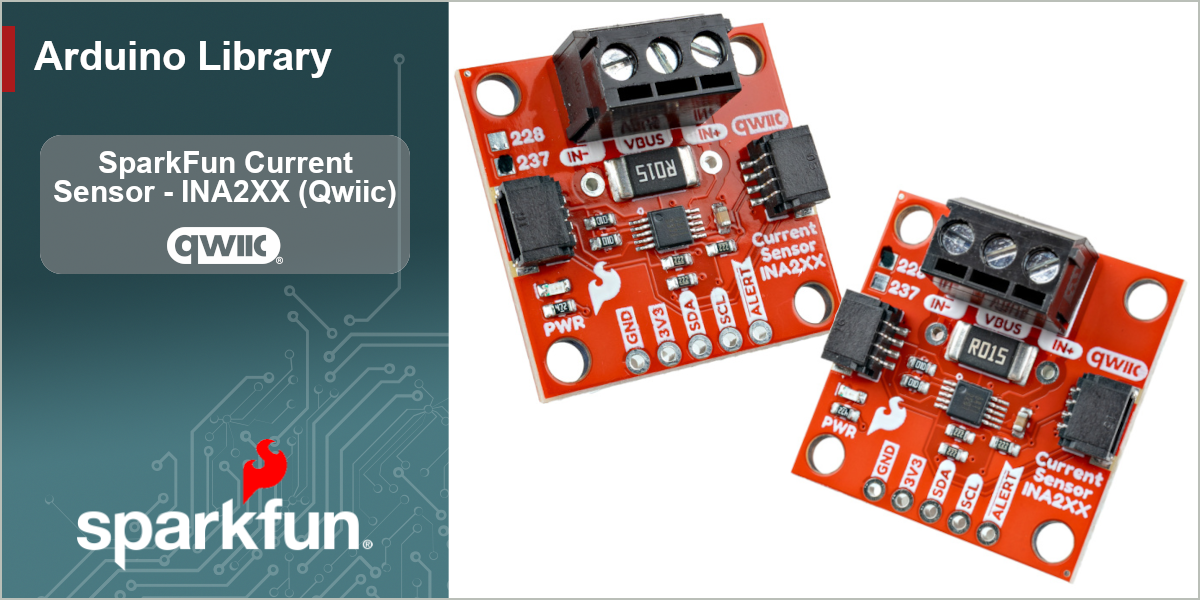
The SparkFun Qwiic Power Monitor puts a Texas Instruments INA2XX-series digital power monitor on a Qwiic-enabled breakout, making high-side current, voltage, and power measurement as simple as plugging in a cable. The board carries a 15 mΩ shunt resistor and a screw terminal for the load and bus connections, so you can measure a supply rail without breaking out a meter.
This library provides an easy-to-use interface to both the INA228 (20-bit, high-precision, with energy and charge accumulation) and the INA237 (16-bit) over I2C, built on the SparkFun Toolkit. Both parts share the same register interface and the same library API — pick the class that matches your board and the rest of your sketch is identical. The library handles device setup and calibration for you and returns real-world readings in amps, volts, and watts, while still exposing the lower-level registers for advanced use.
| Device | ADC | Precision | Energy / Charge | Notes |
|---|---|---|---|---|
| INA228 | 20-bit | High (312.5 nV shunt LSB) | ✅ 40-bit ENERGY + CHARGE accumulators | Use SfeINA228ArdI2C |
| INA237 | 16-bit | Standard (5 µV shunt LSB) | ❌ | Use SfeINA237ArdI2C |
The library exposes the full shared feature set of the INA228 and INA237:
calibrate() for any shunt resistor and expected current range[!NOTE] The INA228 and INA237 share an I2C register map but differ in register width and LSB scaling. The library captures those differences internally (the base driver is a template parameterized on the raw register types), so the same method calls work on both parts.
The board connects over I2C using the Qwiic connector — no soldering required. The INA2XX parts use a default 7-bit I2C address of 0x40, jumper-selectable across 0x40–0x4F.
| Pin / Header | Use | Notes |
|---|---|---|
| Qwiic / I2C | Power + communication | Standard 3.3V Qwiic connection |
| VIN+ / VIN- | Current-sense path | Load current flows through the on-board 15 mΩ shunt between these terminals |
| VBUS | Bus voltage sense | Connect to the rail whose voltage you want to measure |
| ALERT | Alert / interrupt output | Optional — asserts on the alert conditions you enable |
Install through the Arduino Library Manager by searching for SparkFun INA2XX, or download this repository as a ZIP and add it via Sketch > Include Library > Add .ZIP Library. This library depends on the SparkFun Toolkit, which the Library Manager will offer to install alongside it.
The I2C interface is provided by the SfeINA228ArdI2C and SfeINA237ArdI2C classes. Declare the object that matches your device:
In setup(), start I2C and call begin(). begin() initializes the bus and confirms the device is present by checking its Device ID:
Before reading current or power, calibrate the device for your shunt resistor and expected maximum current. The SparkFun board uses a 15 mΩ shunt; this example sets a 10 A maximum:
calibrate() computes CURRENT_LSB and writes the hardware SHUNT_CAL register, after which all current, power, energy, and charge reads are automatically scaled. See Example 05 for using a custom shunt resistor and the reduced ADC range.
[!IMPORTANT] If you change the ADC range with
setADCRange(), call it beforecalibrate()— the calibration math depends on the selected range.
Each measurement is returned through a reference argument:
If you only need the raw register value, getCurrentRaw(), getBusVoltageRaw(), getShuntVoltageRaw(), and getPowerRaw() return the unscaled readings.
Most library methods return a SparkFun Toolkit error code (ksfTkErrOk on success, a negative value on failure) and pass the reading back through a reference parameter. This lets you tell a real reading of zero apart from a communication failure. For simple sketches you can ignore the return value:
For robust applications, check it:
The INA228 adds 40-bit accumulators for energy and charge, read as doubles in Joules and Coulombs:
These methods exist only on SfeINA228ArdI2C.
The DIAG_ALRT register exposes the device's status flags and alert configuration. Thresholds can be set in raw counts or, for the common cases, directly in millivolts:
See Example 02 and Example 06 for the full alert and diagnostic workflow.
The library ships with a set of examples that build from the basics to more advanced features:
API documentation is generated with Doxygen and published to GitHub Pages from the main branch.
If you would like to contribute to this library, please report issues and submit pull requests against the GitHub repository.
This product is open source!
This product is licensed using the MIT Open Source License
Please see LICENSE.md for more information.
 1.9.5
1.9.5