Arduino Examples
Let's take a closer look at a few of the examples included in the SparkFun BMA456 Arduino library.
[!NOTE] The BMA456 feature engine runs one Bosch configuration at a time. For step counting and activity use
myAccel.begin(sfeBMA456FeaturesH). For orientation, high-g/low-g (free fall) and significant motion, usemyAccel.begin(sfeBMA456FeaturesMM). Both feature sets include tap, any/no-motion and auto low power.myAccel.begin(sfeBMA456FeaturesNone)skips the features and runs the BMA456 as a plain accelerometer.
Example 1 - Basic Readings - I2C
The first example demonstrates how to initialize the BMA456 over I2C with default settings: 100 Hz, ±4 g and continuous filtering. Open the example by navigating to File > Examples > SparkFun BMA456 Arduino Library > Example01_BasicReadingsI2C. Select your Board and click the Upload button. Once the code finishes uploading, open the serial monitor with the baud set to 115200.
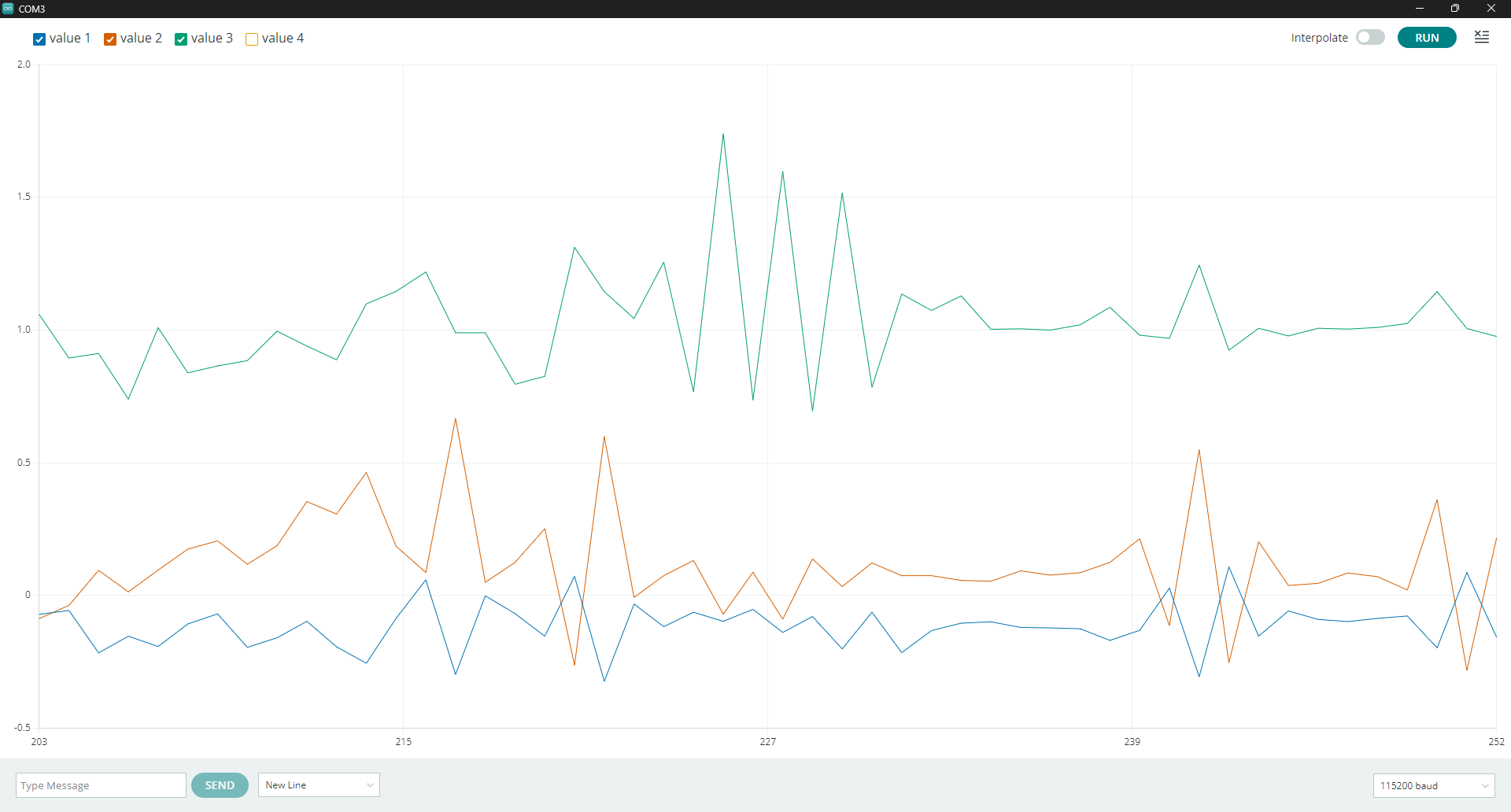
After initializing, the example prints out acceleration values in g for each of the three axes every 100ms. To see a graphic representation of the acceleration data, open the serial plotter in Arduino and shake the sensor around and you'll see something like this:
Example 3 - Interrupts
[!NOTE] The following several examples all use one or more of the BMI330's interrupt pins. If you're not familiar with using interrupts in Arduino, you may want to read through their documentation on them here. The examples default to work with a RedBoard Plus and attach INT1 to
D2and INT2 toD3. If you're using a different microcontroller, you'll want to refer to your board's documentation or the table for common interrupt pins on this page and then adjust the code to the correct pin number. To change the assigned interrupt pin, look for the line similar toconst uint8_t kInterruptPin = 2;at the beginning of each of the interrupt examples.
The third example shows how to configure interrupts to have the BMA456 tell the host when a sample is ready. The example sets the BMA456's output data rate to 50 Hz and routes the data-ready interrupt to INT1 to read one sample per interrupt.
The example sets the data-ready interrupt as push-pull, active high and latched until the status is read:
    sfe_bma456_int_pin_config_t pinConfig;
    myAccel.setInterruptPinConfig(BMA456_INT1, pinConfig);
    myAccel.setInterruptLatch(true);
    myAccel.mapInterrupt(BMA456_INT_SRC_DATA_READY, BMA456_INT1);
Example 5 - FIFO Buffer
This example shows how to use the BMA456's FIFO buffer and trigger an interrupt when it has enough samples to send to the microcontroller. The BMA456 has a 1kB FIFO and this sketch has the sensor collect samples and read them out in a burst. The example runs the BMA456 at 100 Hz, sets the watermark at 25 frames and runs the watermark interrupt to INT1 so it fires four times a second and each watermark includes 25 samples.
Example 6 - Motion Detection
Example 6 covers how to use the BMA456's embedded motion detection feature. The motion detection feature watches for two states: any-motion or no-motion. This allows the sensor to remain in standby mode while still and only power up when it detects motion to help drastically reduce power consumption. This example routes the any-motion interrupt to INT1 and no-motion to INT2. Note, this example just shows how to use the motion detection feature does not toggle the BMA456 in and out of low power. Refer to Example 10 in the library for a low power example.
Two things to note about these settings are Threshold and Duration. The values set here are the hardware's and not SI. Threshold is 1/2048 g per LSB or about 0.488 mg. A threshold of 205 is ~100 mg. Duration is 20 ms per LSB and the feature engine runs at 50 Hz so a duration of 5 is 100 ms. One last thing to note is the motion detection monitor the slope of acceleration, ie. the change between samples, and not the magnitude.
The code sets the anyMotion interrupt to trigger at ~100 mg of slope for 100 ms:
    sfe_bma456_motion_config_t anyMotion;
    myAccel.getAnyMotionConfig(anyMotion);
    anyMotion.threshold = 205; // 205 x 0.488 mg = 100 mg of slope
    anyMotion.duration = 5;    // 5 x 20 ms = 100 ms
    myAccel.setAnyMotionConfig(anyMotion);
and sets the noMotion interrupt to trigger at under ~50 mg of slope for 2 seconds to avoid false triggers:
    sfe_bma456_motion_config_t noMotion;
    myAccel.getNoMotionConfig(noMotion);
    noMotion.threshold = 102; // 102 x 0.488 mg = 50 mg
    noMotion.duration = 100;  // 100 x 20 ms = 2 s
    myAccel.setNoMotionConfig(noMotion);
Example 7 - Orientation Change
This example shows how to use another of the BMA456's embedded features: orientation. The orientation feature classifies the board position as portrait or landscape (and optionally face up/down) and interrupts when that position changes like when a phone rotating its screen when turned.
The code sets up the orientation set to enable both orientation and face up/down and also sets the blocking to most aggressive to avoid false triggers while the board is in motion. It also sets the mode to symmetrical so each sector is 90 degrees:
    sfe_bma456_orientation_config_t config;
    myAccel.getOrientationConfig(config);
    config.upsideDown = true; // Report face up / face down as well
    config.mode = 0;          // Symmetrical: the four sectors are 90 degrees each
    config.blocking = 3;      // Most aggressive: ignore changes during motion
    myAccel.setOrientationConfig(config);
After uploading, open the serial monitor with the baud set to 115200 and stand the board on its edge. Try rotating it a quarter turn at a time to walk through the four states. Lay it flat and turn it over to see face up/down.
Example 8 - Tap Detection
The eighth example demonstrates how to use the tap detection feature. Tap detection can detect single, double and triple taps over a single interrupt. This example also includes prints of the tap parameters so you can tune them to avoid false events or no events at all. The example sets these thresholds to a firm fingertip tap on a small device.
Example 9 - Step Counter & Activity
Example 9 shows how to use the BMA456's integrated step engine acts as both a step counter and activity tracker. The BMA456H feature set counts steps on the device and interrupt the host whenever a set number of steps (N x 20) is recorded. The engine also classifies what type of motion is detected (still, walking or running) and interrupts when that changes. This example uses both on INT1. It sets the step counter interrupt (the watermark) for every 20 steps and sets the activity interrupt to fire on every change of classification:
    myAccel.setStepCounterWatermark(1);
    myAccel.resetStepCount();

    sfe_bma456_int_pin_config_t pinConfig;
    myAccel.setInterruptPinConfig(BMA456_INT1, pinConfig);
    myAccel.setInterruptLatch(true);
    myAccel.mapInterrupt(BMA456_INT_SRC_STEP_COUNTER, BMA456_INT1);
    myAccel.mapInterrupt(BMA456_INT_SRC_ACTIVITY, BMA456_INT1);

    myAccel.enableFeature(BMA456_FEAT_STEP_COUNTER | BMA456_FEAT_STEP_ACTIVITY);
The step counter design ignores isolated jolts so the count may be off for the first few steps and then jump to catch up. After uploading the code, open the serial monitor with the baud set to 115200 and hold the board at your waist (or put it in your pocket) and walk, then jog and you'll see steps and activity print out.
Example 10 - Auto Low Power
The tenth example demonstrates how to use the BMA456 auto low-power feature. This feature engine drops the accelerometer into a slow averaging mode automatically when not in motion and then restores the hosts configuration the moment it detects motion. This helps reduce power consumption and also reduces processing requirements from the host as the host does nothing at all, no polling or mode changes.
The auto low-power mode has two entry conditions: onTimeout and onNoMotion. These conditions can be used individually, simultaneously or not at all. onTimeout triggers when any-motion is silent for the timeoutDuration (20 ms per LSB). onNoMotion triggers when the no-motion detecter fires. Both conditions exit on any-motion. This example configures the BMA456's "awake" state to run at 100 Hz, 4 sample averaging and at a range of ±2 g and prints the power state whenever it changes.
The example sets the wake-up sensitivity to ~50 mg of slope for 40 ms and the timeout duration to 2 seconds of no motion:
    sfe_bma456_motion_config_t anyMotion;
    myAccel.getAnyMotionConfig(anyMotion);
    anyMotion.threshold = 102;
    anyMotion.duration = 2;
    myAccel.setAnyMotionConfig(anyMotion);
    myAccel.enableFeature(BMA456_FEAT_ANY_MOTION);

    sfe_bma456_auto_low_power_config_t alp;
    alp.onTimeout = true;
    alp.timeoutDuration = 100; // 100 x 20 ms = 2 s without motion
    alp.onNoMotion = false;
    alp.lowPowerODR = BMA456_LP_ODR_1_56_HZ;
    alp.featureOptimizedConfig = true; // Let the engine choose the low-power ACC_CONF
    myAccel.setAutoLowPowerConfig(alp);
After uploading the example, open the serial terminal with baud at 115200 and it should print out "ready. Leave the board still for two seconds, then move it." The main loop then prints out whether it is in low power mode (1.56 HZ) or Awake.