MicroPython
MicroPython Firmware
The Thing Plus - ESP32-C5 comes with MicroPython firmware pre-installed on the board.
MicroPython Examples
The MicroPython firmware includes two basic WiFi examples to get users started with the Thing Plus - ESP32-C5. In your preferred MicroPython interpreter or IDE, connect to the COM port the Thing Plus is connected to. In an IDE like Thonny, the Thing Plus appears as a COM port labeled "ESP32" or something similar.
Once connected, open the examples folder from the device. Let's take a closer look at the WiFi Scan example.
WiFi Scan Demo
Navigate to the Thing Plus's device menu and open the "wifi_demo.py" example. Once the example opens, either click the "Run" button in your IDE or send the command to run the example. The example creates a WiFi access point, creates a WiFi station and then performs a WiFi access point scan to detect WiFi networks and devices in its range. Once it finishes the scan it prints out all networks and devices it sees over serial:
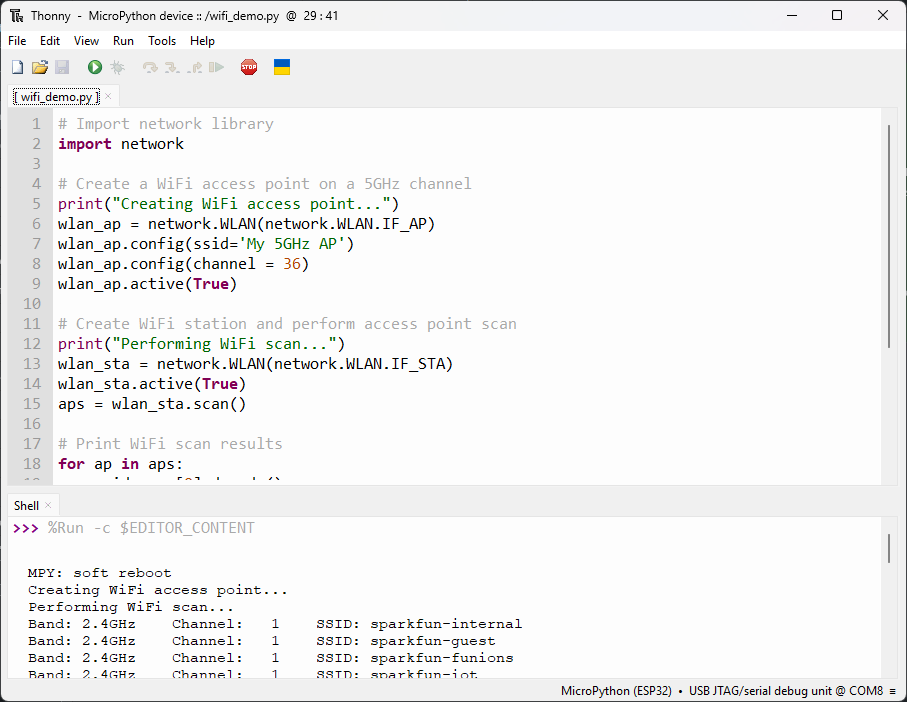
This list includes the WiFi Band, Channel and SSID of all networks and devices it detects in range.