Configure with CLI
- EVK:
- Facet mosaic:
- Postcard:
- Torch:
- TX2:
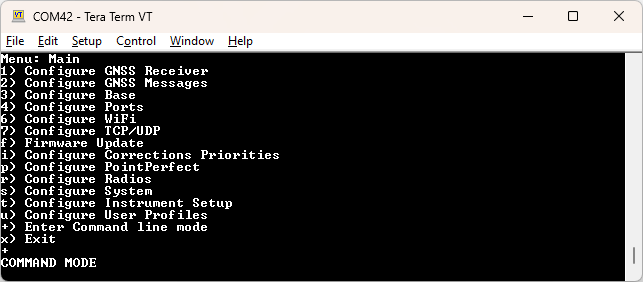
Entering Command line mode
For advanced applications, the RTK device can be queried and configured using a command line interface (CLI). This mode can be entered from the main serial menu using '+' or over Bluetooth by sending 10 dashes ('----------'). To exit CLI, type exit or use the $SPEXE,EXIT*77 command.
The commands and their responses are implemented as an extension to the standard NMEA format. This allows the use of the same parser to parse NMEA sentences and the SparkFun commands/replies.
Each command or response sentence begins with the talker id $SP.
The commands end with a * followed by a two hex character checksum, and then a
Checking For an Active Command Interface
The client can check whether the command interface is active by sending the following command.
$SPCMD*49<CR><LF>
If the command interface is active, the receiver will respond with the following within 2 seconds.
$SPCMD,OK*61<CR><LF>
If the expected response is not received, the client may attempt to send the escape sequence again to enter the command interface.
Getting Configuration Values
To get a setting value, the client sends the following.
$SPGET,[setting name]*FF<CR><LF>
The receiver responds with
$SPGET,[setting name],[setting value]*FF<CR><LF>
If there was an error in getting the setting value, such as the setting name being unavailable, the receiver responds with the following error message.
$SPGET,[setting name],,ERROR,[Verbose error description]*FF<CR><LF>
Example
For example, to get the elevation mask:
Send:
$SPGET,elvMask*32<CR><LF>
Receive:
$SPGET,elvMask,15*1A<CR><LF>
If a setting is a string, the setting will be surrounded in quotes. Any internal quotes will be escaped.
Getting Changed Settings
To retrieve only CLI settings that differ from their factory defaults, send:
$SPGET,changedSettings*36<CR><LF>
The receiver first sends device metadata (deviceName, bluetoothId, deviceId, profileNumber,
espFirmwareVersion, and gnssModuleInfo; tiltState is included on tilt-capable platforms). It then sends one
$SPLST,[setting name],[setting type],[setting value] response for each changed setting, followed by:
$SPGET,changedSettings,[number of changed settings],OK*FF<CR><LF>
The checksum in each response is calculated by the receiver. This query is intended for clients that already know the device model and setting definitions.
For direct serial testing, enter changed to list the changed settings without NMEA command framing.
Getting Tilt State
To get the current tilt sensor state, send:
$SPGET,tiltState*FF<CR><LF>
The receiver returns the numeric TiltState enum value. The response does not include the IM19 navigation-status bitfield.
Send:
$SPGET,ntripClientCasterUserPW*35
Receive:
$SPGET,ntripClientCasterUserPW,"pwWith\"quote"*38
Setting the Configuration Values
To set a configuration value, the client sends the following.
$SPSET,[setting name],[new value]*FF<CR><LF>
The receiver responds with
$SPSET,[setting name],[new value],OK*FF<CR><LF>
If there was an error in setting the value, such as the setting name being unknown, the receiver responds with the following error message. The previous value is optional and will be blank in case the setting name is not found.
$SPSET,[setting name],[optional: current value],ERROR,[Verbose error description]*FF<CR><LF>
Example
For example, to set the elevation mask:
Send:
$SPSET,elvMask,15*0E<CR><LF>
Receive:
$SPSET,elvMask,15,OK*26<CR><LF>
Using the $SPSET command only sets the configuration value in the firmware memory. The settings are not applied until an APPLY action is executed.
Settings containing strings must be surrounded by quotes:
Send:
$SPSET,ntripClientCasterUserPW,"MyPass"*08
Receive:
$SPSET,ntripClientCasterUserPW,"MyPass",OK*20
Below, quotes are allowed within the string but must be escaped. Response will also be escaped, but the device will store the setting with escape characters removed:
Send:
$SPSET,ntripClientCasterUserPW,"pwWith\"quote"*2C
Receive:
$SPSET,ntripClientCasterUserPW,"pwWith\"quote",OK*04
ntripClientCasterUserPW will be set to: pwWith"quote
Below, commas are allowed within the string but must be between two quotes:
Send:
$SPSET,ntripClientCasterUserPW,"complex,password"*5E
Receive:
$SPSET,ntripClientCasterUserPW,"complex,password",OK*76
ntripClientCasterUserPW will be set to: complex,password
Below is a combination of an internal escaped quote, and comma within a setting:
Send:
$SPSET,ntripClientCasterUserPW,"a55G\"e,e#"*5A
Receive:
$SPSET,ntripClientCasterUserPW,"a55G\"e,e#",OK*72
ntripClientCasterUserPW set to: a55G"e,e#
Receiver Actions
The $SPEXE command can be used to execute various actions on the receiver.
$SPEXE,[action name]*FF<CR><LF>
The receiver responds with the following.
$SPEXE,[action name],OK*FF<CR><LF>
The response is sent before carrying out the action if it involves a reboot or exit. It is sent after carrying out the action if the receiver will remain in command mode.
If the receiver is unable to carry out the action, the following error message is returned.
$SPEXE,[action name],ERROR*FF<CR><LF>
The following actions shall be implemented.
APPLY: applies the currently stored settings, rebooting if necessary.SAVE: Saves current settings to NVMEXIT: Exits the command interfaceREBOOT: Restarts the receiver firmware without applying settings.LIST: List all firmware configuration fields.
LIST Action
Executing the list action will return a list of the configuration values.
Send:
$SPEXE,LIST*75<CR><LF>
The response is in the form of multiple $SPLST sentences, followed by an acknowledgement of the $SPEXE command.
The $SPLST sentences shall have the following structure:
$SPLST,[setting name],[data type],[current value]*FF<CR><LF>
The data type contains whether the field is a char[n], int, bool, or float.
Example
Example response:
$SPLST,enableSD,bool,true*6A<CR><LF>
$SPLST,enableDisplay,bool,true*27<CR><LF>
$SPLST,maxLogTime_minutes,int,1*01<CR><LF>
$SPLST,maxLogLength_minutes,int,10*38<CR><LF>
$SPLST,observationSeconds,int,10*37<CR><LF>
$SPLST,observationPositionAccuracy,float,0.5*59<CR><LF>
.
.
.
$SPEXE,LIST,OK*5D<CR><LF>