Introduction
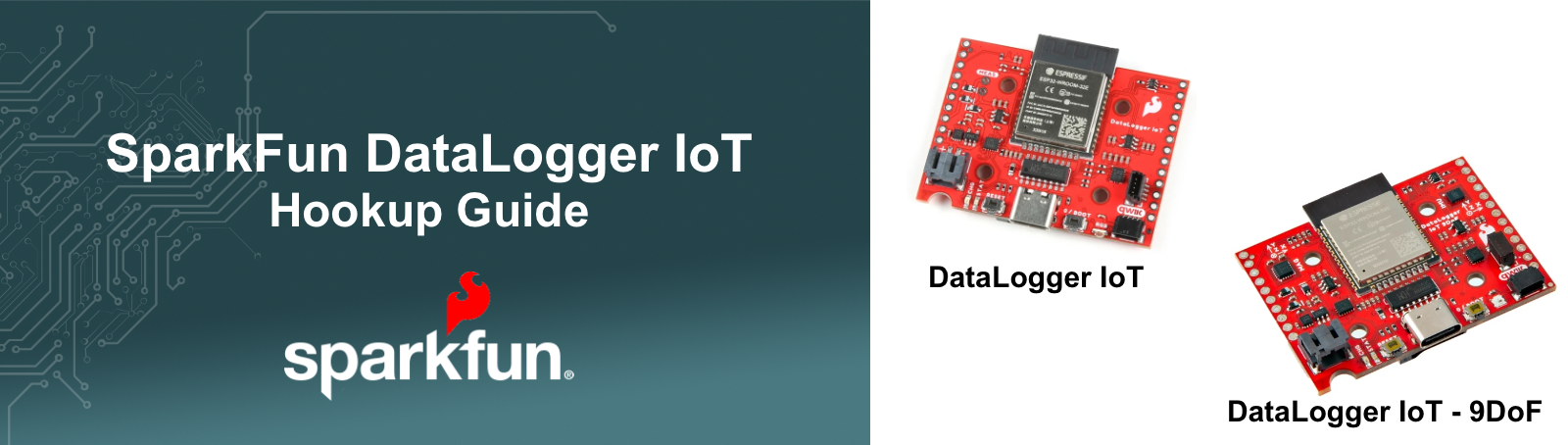
The SparkFun DataLogger IoT is a data logger that comes preprogrammed and ready to use immediately - no programming, no setup - just plug in the board, add a supported qwiic sensor or two and start logging data. The built-in firmware automatically detects attached qwiic sensors, peforms any setup and starts logging sensor data. And with minimal configuration, the DataLogger IoT can connect to a local WiFi network and post data to a wide range of IoT data services.
The DataLogger IoT automatically detects, configures, and logs Qwiic sensors. It was specifically designed for users who just need to capture a lot of data with minimal setup or development. It delivers a ready-to-use device that enables saving data to a microSD card, output it to a serial console andor send it wirelessly to your preferred Internet of Things (IoT) services - all at that same time!
To configure the DataLogger, a menu system is accessed via a serial connection and provides access to all available settings for the system. Changes are automatically saved in persistant storage on the device, and are also settable/accessable as a json file if desired. Details on setting up the system are outlined in the Settings section of this manual.
DataLogger Devices
The following devices support the DataLogger IoT functionality discussed in this document.
- SparkFun DataLogger IoT - the core DataLoggerIoT Device
- SparkFun DataLogger IoT - 9DoF - A DataLoggerIoT with on-board 9DoF (Direction-of-Freedom) sensors.
Quick Start
Overall, the SparkFun DataLoggerIoT is ready for operation and requires no programming or software development. Just plug in a supported sensor and beging logging data to the serial console. With a little additiona setup, data is logged to a variety of common IoT data services as well as to an on-board SD card.
Common items required when using the DataLoggerIoT
For general use and for following the documentation provided, the following items are used:
- A supported SparkFun DataLogger IoT board
- microSD card formatted with FAT32 [COM-15107]
- USB C Cable for communication and power
- A qwiic Cable
- At least one Qwiic enabled devices that is compatible
- For battery powered operation, a Lithium Ion Battery
Basic Hardware Setup
The simple hardware setup is as follows:
- Connect a supported qwiic sensor to the datalogger.
- Connect the datalogger to a computer using a usb-c cable
- Connected to the datalogger via a Serial Terminal
Basic Configuration Setup
Once connected to the DataLoggerIoT using a serial terminal, pressing any key on the keyboard will bring up the menuing system.
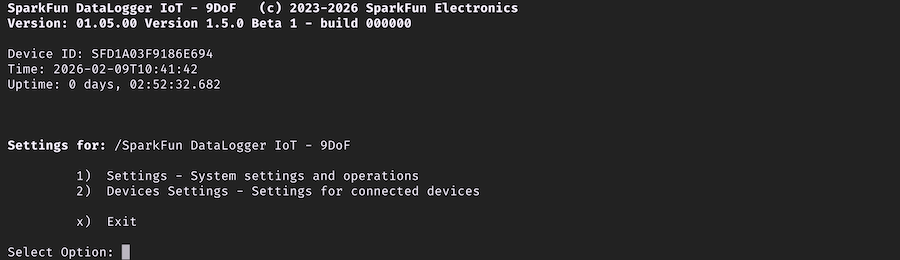
To navigate the menu, press the menu item number on your keyboard - this will select the desired menu. So if you want to assess the Settings menu item in the main menu, press the number 1 on your keyboard.
To exit a menu perform on of the following:
- Press the
bkey (back) to return to the previous menu - At the main menu, press
xto exit (bworks also). Any changes to settings are saved to on-board storage - Press the
Escapekey (esc) to return to the previous menu item. If at the main menu, any changes are not save to on-board storage.
If you don't exit a menu, after a timeout period (60 seconds default), the menu will exit as if the escape key was pressed.
If you make configuration changes, but don't exit the menu to save the changes, the changes will not be saved to on-device storage.
Once menu navigation is understood, explore the options available and make changes to meet your needs. The configuration options are detailed in a majority of this on-line guide.
The Sensors
Straight out of the box anti-static bag, the DataLogger IoT 9DoFis ready to log data from its built-in ISM330DHCX Inertial Measurement Unit (IMU) and MMC5983MA magnetometer. Only want to log magnetometer, accelerometer, gyro or temperature data? You’re good to go! But the fun is only just beginning…
The DataLogger IoT is preprogrammed to automatically log data from all of the following sensors, so you may wish to add one or more of these to your shopping cart too. (More sensors are being added all the time and it is really easy to upgrade the DataLogger IoT to support them. But we'll get to that in a moment!). Currently, auto-detection is supported on the following Qwiic-enabled products (with the exception of the ISM330DHCX and MMC5983 which is built-in on the 9DoF variant):
For a list of supported devices based on the firmware, you can check out the list of supported Qwiic Devices in the appendix