Application Settings
The following settings are presented in the General > Application Setting menu of the settings.
When the selected, the following menu is presented:
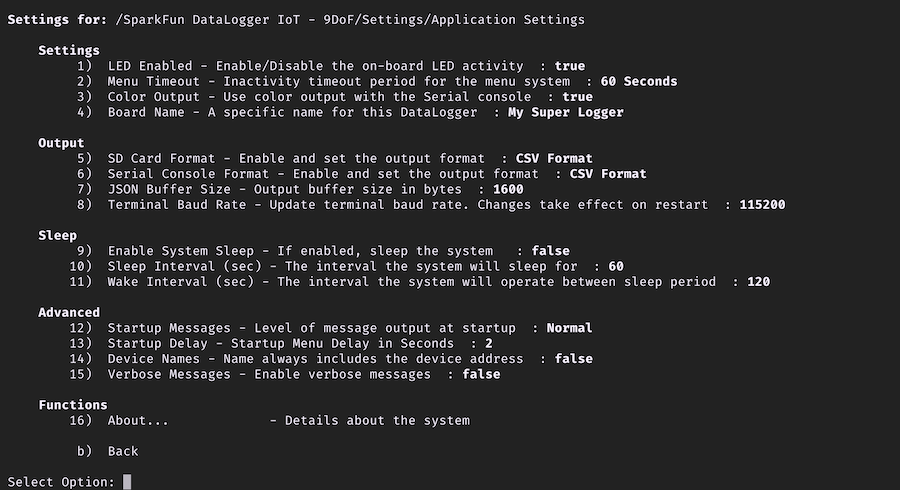
The following provides an overview of each setting in this menu.
Settings
LED Enabled
Used to control if the on-board RGB LED is enabled or disabled.
Menu Timeout
The settings menu will timeout - exit to the previous level - if no input is provided within the specified timeout period. The default value is 60 seconds.
Color Output
The menu system of the DataLoggerIoT can user color to highlight specific elements of the menu textual output. This option controls if color is enabled or not. This value is enabled by default
Board Name
Set this value to the name of the specific board.
Output
SD Card Format
Set the format to use when writing data to the SD Card - CSV Format and JSON Format are supported.
Serial Console Format
Set the format to use when writing data to the Serial Console - CSV Format and JSON Format are supported.
JSON Buffer Size
When building JSON output, a string buffer is allocated and used. This setting is used to adjust the size of this buffer.
If the buffer size is exceeded, a non-valid JSON value is output by the system.
The runtime maximum use size of the buffer is output in the about screen of the DataLoggerIoT. This is helpful in adjusting the size of the buffer.
Terminal Baud Rate
The baud rate used when connected to a Serial Terminal application.
When changed, the DataLoggerIoT must restart of the setting to take effect.
Once the baud rate is change, the baudrate on the serial termainal application will also require updating
Sleep
Enable System Sleep
If enabled, the DataLogger IoT will enter a sleep mode for a set number seconds between data recording. This setting can be used to reduce the overall power consumption of the DataLoggerIoT device when powered by a battery.
When this feature is enabled, the DataLoggerIoT will sleep for Sleep Interval seconds, then wake to sample data for Wake Interval seconds. This cycle continues until the setting is changed.
Sleep Interval (sec)
The number of seconds the DataLoggerIoT sleeps
Wake Interval
The number of seconds the DataLoggerIoT samples data. Once this period ends, the system enters sleep mode
Advanced
Start Messages
This setting allows adjustment of the amount of messages output during startup.
The messages levels are:
- Normal - all messages are shown.
- Compact - a minimal set of messages are output.
- Disabled - no startup messages are output.
Startup Delay
When the DataLogger IoT starts, a startup menu is shown for a specific amount of time. This setting is used to set the time period the menu is dispalyed.
If set to 0, the menu is not shown.
Device Names
If enabled, Device Names will also include the device address. This is helpful if two devices of the same type are connected to the DataLoggerIoT.
Verbose Messages
If enabled, additional informational and debug messages are output to the console during DataLoggerIoT operation
Functions
About...
When selected, the about page is displayed for the DataLoggerIoT.