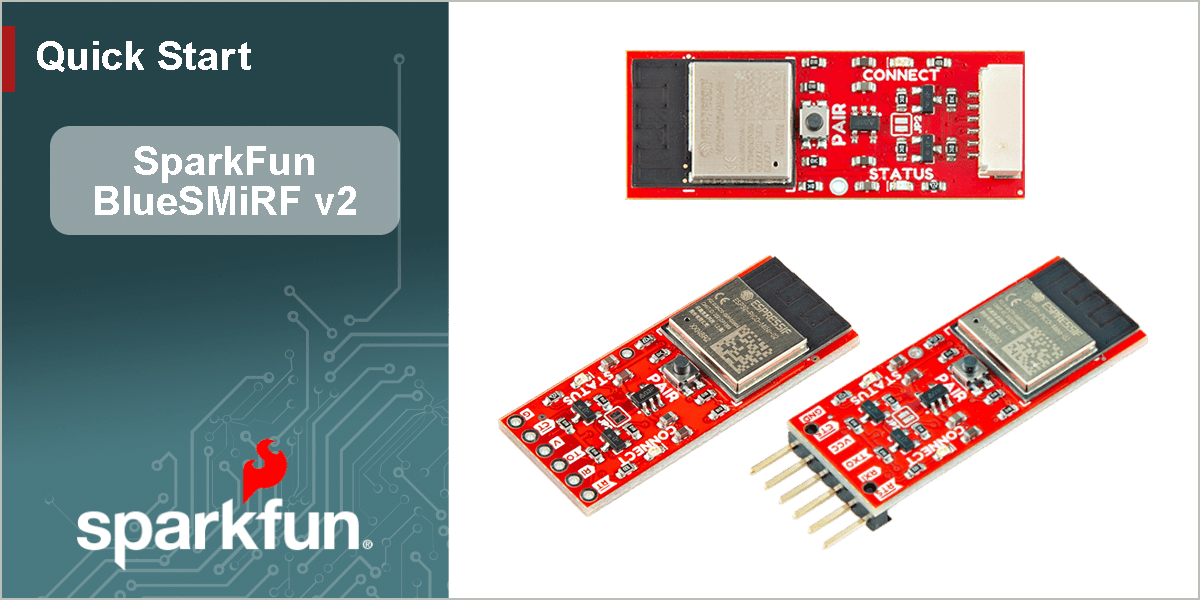
Quick Start Guide
What's New?
The design of the BlueSMiRF is similar to previous generations. However, we have made a few design improvements that users will appreciate. In testing, we got about ~110 feet (~33m) of range from a pair of BlueSMiRF v2s in the SparkFun building.
- Features an ESP32-PICO-MINI-02 module programmed with our open-source firmware
- Easily update the firmware Over-the-Air or through the serial interface
- Configure the settings with AT-commands
- A user button has been added to simplify pairing, triggering various modes of operation, and resetting the factory defaults
- We manufacture three variants, with different connections to simplify hooking up the BlueSMiRF to your project
- PTH pad and male header variants, which now have pin labels on both sides of the boards
- JST variant that is easily connected to our high-precision GNSS breakout boards
Info
For a full background on the development and design revisions of the BlueSMiRF, check out the Board Revision History page of this guide.
Board Layout
The SparkFun BlueSMiRF v2 features the following:
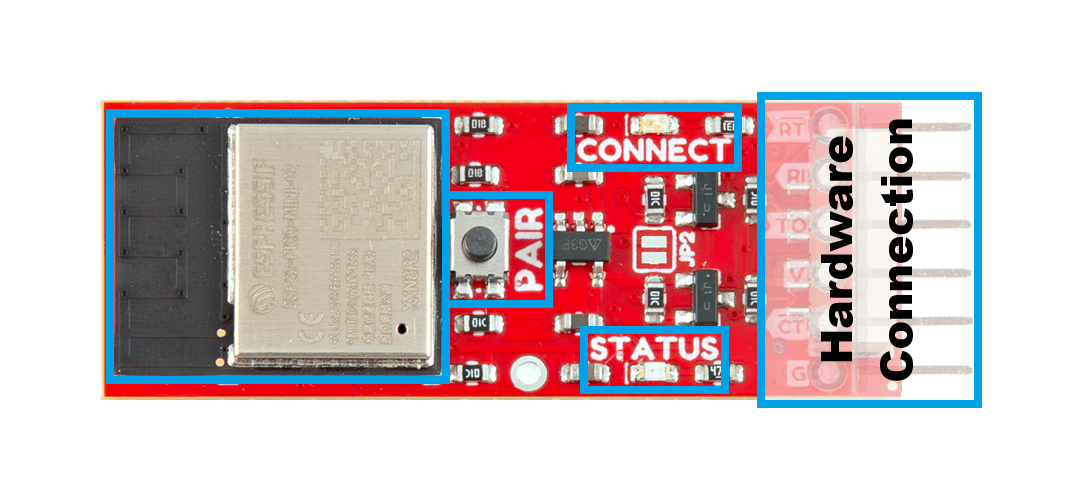
The primary features of the BlueSMiRF v2 boards.
-
- ESP32 Module
- Espressif's ESP32-PICO-MINI-02 module
-
- PAIR Button
- A multi-use button used to changes between the various modes of operation.
-
- Status LEDs
- The green
CONNECTand redSTATUSLEDs are used to indicate various modes of operation.
-
- Hardware Connection
- This connection breaks out the pins for the UART interface and power supply for the BlueSMiRF. Additionally, the three variants provide different options for connecting the BlueSMiRF to their project.
Board Variants
-
PTH Pads
-
Male Header Pins
-
JST-GH Connector
Manipulate 3D Model
| Controls | Mouse | Touchscreen |
|---|---|---|
| Zoom | Scroll Wheel | 2-Finger Pinch |
| Rotate | Left-Click & Drag | 1-Finger Drag |
| Move/Translate | Right-Click & Drag | 2-Finger Drag |
Pin Connections
Each variant of the BlueSMiRF v2, has a different connector. The pin layout for these connections, are summarized in the table below.
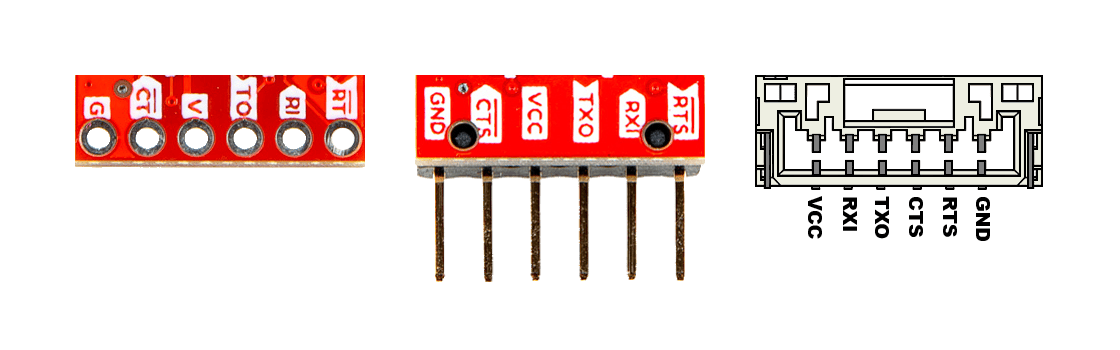
The pin connections on the BlueSMiRF v2.
| Label |
VVCC
|
RIRXI
|
TOTXO
|
CTCTS
|
RTRTS
|
GND
|
|---|---|---|---|---|---|---|
| Function |
Voltage Input 3.3 to 6.0V |
UART - Receive | UART - Transmit |
Flow Control Clear-to-Send |
Flow Control Ready-to-Send |
Ground |
Backwards Compatibility
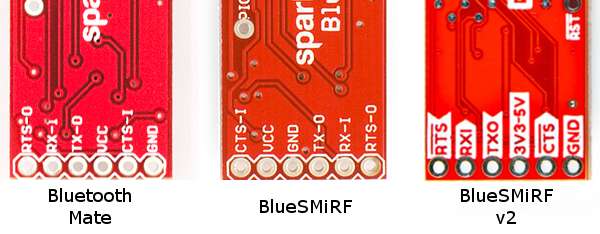
The pin layout of the BlueSMiRF v2 variants with the PTH pads and male header pins, will only be backwards compatible with previous versions of the BlueSMiRF Mate, as shown in the image below.
Device Operation
Create a Serial Link
- Device 1: By default, the device be in discoverable mode and be available for pairing.
- Device 1 will broadcast the name
BlueSMiRF-Pairingand wait for an incoming connection.
- Device 1 will broadcast the name
- Device 2: Hold the PAIR button for 4 to 8 seconds, then release.
- Device 2: Will then enter pairing mode and scan for any compatible devices to pair with.
- The scan should find that Device 1 is in discoverable mode broadcasting the
BlueSMiRF-Pairingname.
- The scan should find that Device 1 is in discoverable mode broadcasting the
- Device 2: Connects to Device 1
- Device 2 stores the MAC address of Device 1
- Whenever Device 2 boots up, it will always try to connect to the stored the MAC address (i.e. Device 1).
- Device 1: Remains agnostic of any connections or pairing; no MAC address has been stored on it.
- When Device 1 boots, it will not attempt to connect to any devices.
Note
The BlueSMiRF that was detected (Device 1), does not store the MAC address of the pairing BlueSMiRF (Device 2). Upon restart, the BlueSMiRF (Device 1) will return to the (default) discoverable mode.
Configure Settings
- Bluetooth Serial Link:
+++(remote access)
Tip
The settings of the command key can be reconfigured with the following commands:
Below is a short list of AT-commands and parameters that are commonly used:
| AT Command | Command Description |
|---|---|
$$$ |
Enter Command Mode - Hardware connection |
+++ |
Enter Command Mode - Bluetooth connection |
AT? |
Display this help text |
ATF |
Restore factory settings |
ATP |
Start pairing process |
ATW |
Save current settings to NVM |
ATX |
Exit command mode |
ATZ |
Reboot the system |
AT-<Param>=<value> |
Set parameter's value to xxx by name (Param) |
| AT Command | Command Description | Factory Default Value |
|---|---|---|
AT-SerialSpeed |
The baud rate that the BlueSMiRF operates at. | 115200 |
AT-WiFiPassword |
Password for the SSID, used for over-the-air-updates | |
AT-WiFiSSID |
SSID used for over-the-air-updates |
Restore Factory Defaults
There are two methods to restore the device's settings to their factory defaults.
- Access the command mode, then use the
ATFandATWAT-commands to restore and save all the settings to their factory defaults. - Hold the PAIR button down for more than 8 seconds, until the
STATUSandCONNECTLEDs to quickly blink back and forth. When the button is released, all the settings will be restored to their factory defaults.
Firmware Update
Because it's much easier to use, we recommend the OTA firmware update process.
- Enter command mode:
- UART Interface:
$$$ - Bluetooth Serial Link:
+++(remote access)
- UART Interface:
- Configure the
AT-WiFiSSIDandAT-WiFiPasswordparameters for your local WiFi network - Save the new settings (
ATW) - Issue the
ATCcommand to check for new firmware. - If new firmware is available, send the
ATUcommand to begin an update. - The device will restart after the update process is complete
Example
Below, is an example of this method using the UART interface. In the example, the WiFi network's SSID is sparkfun-guest and its password is sparkfun6333. The highlighted lines represent the commands that were sent.
Terminal
BlueSMiRF-v1.0

$$$
OK
at-wifissid=sparkfun-guest
AT-WIFISSID=sparkfun-guest
OK
at-wifipassword=sparkfun6333
AT-WIFIPASSWORD=sparkfun6333
OK
atw
ATW
OK
atc
ATC
Connecting to sparkfun-guest...
Connected!
Checking to see if an update is available from https://raw.githubusercontent.com/sparkfun/SparkFun_BlueSMiRF-v2_Binaries/main/BlueSMiRF-Firmware.json

Current firmware version: v1.0

New firmware version available: 1.1

OK
atu
ATU
Connecting to sparkfun-guest...
Connected!
Getting new firmware
Installing new firmware

[ 0%

[ 1%

[ 2%

.
.
.

[=================== 99%

[==================== 100%
]
BlueSMiRF-v1.1